
According to my experience before and not just one time but a lots of it
when I try to remove some appilcation from my control panel some are very much
hard to be uninstall. I really dont know why their is some instances that way
But when I notice something I found out that their is a
particular solution which is only intended for that problem
that software which is hard to remover will be over....
the software called "tweak ui" this will help you to unistall forcefully
those unwanted program that you dont want to used.
Heres the instruction for tweak ui PowerToy follow the steps :
1. Click Start, Go to Settings, click Control Panel,
and then double- click TweakUI, which yuo have installed currently.
2. Now again click the Add\Remove tab, click
the program that you want to remove,(which is not being
removed by simple process) and then click Remove.
3. Click OK, and then close Control Panel. Your program will
be uninstalled.
Now you dont have the problem when it comes to those that are hard to removed from
your computer,
Showing posts with label application. Show all posts
Showing posts with label application. Show all posts
Tutorial on how to remove the unremovable software

ESET NOD32 Anti-Virus 4.0.468.0
First thing you need to know before installing some application to you personal computer is to know the requirements of that software whether this software causes your pc to slow down or whatever but this anti virus that am going to talk about is the best anti virus i been using this quite a few months already.. If you haven't try or used it before.. at the bottom you can see the download of this torrent for completely free..
ESET NOD32 Antivirus Overview
You didn't buy your computer to run antivirus. That's why ESET NOD32 Antivirus gives you fast, effective and easy-to-use protection without getting in your way. Smart proactive detection blocks most known and emerging threats hours or days faster than other antivirus technologies. Fast, light and unobtrusive software protects your Internet experience without annoying system slowdowns.
Key Benefits
* Keeps you safe from viruses, spyware, trojans, password stealers and other malware threats
* Stops most new threats proactively, well before other vendors have issued a signature, maximizing your defense against new and unknown threats
* Scans and cleans Internet traffic and email, even when it's SSL-encrypted, so your email is always safe
* Stops threats from entering through removable devices so you can share files with confidence
* Integrated SysInspector and SysRescue simplify system diagnosis and recovery
* Self defense prevents malware from degrading your level of protection
* Tiny signature updates happen discretely as needed and won't bog down your system
* Free technical support via the Web, email or phone
Key Features
Smarter Scanner – Threats don't always enter your network in ways you expect. ESET NOD32 Antivirus inspects SSL-encrypted communication channels like HTTPS and POP3S and intelligently scans compressed files to find hidden threats other products miss. Proactive protection begins at the earliest point in system startup to ensure your computer is always secure.
Clean and Safe Email – Email scanning for Microsoft Outlook, Outlook Express, Mozilla Thunderbird, Windows Live Mail, Windows Mail, and other POP3/IMAP mail clients, ensuring your email is free of viruses and other threats.
Removable Media Security – Threats can enter your PC from removable media such as USB thumb drives. For self-running media, ESET NOD32 Antivirus scans autorun.inf and associated files when the medium is inserted, in addition to scanning any file on any removable device when it is accessed, or during a full-scan of the media. Power users can adjust ESET NOD32 Antivirus to perform additional levels of scanning on removable media.
System Tools – ESET SysInspector and ESET SysRescue simplify diagnosing and cleaning of infected systems by allowing deep scans of system processes to find hidden threats, and creating bootable rescue CD/DVD or USB drives to help you repair an infected computer.
Self Defense – ESET NOD32 Antivirus has built-in technology to prevent malicious software from corrupting or disabling it, so you can rest assured your system is always protected.
ESET NOD32 Antivirus Screen Shots
Many Usability Improvements – ESET NOD32 Antivirus has numerous speed, security and usability upgrades.
* Energy-sipping battery mode extends laptop battery life without compromising security
* Advanced Protection Status screen informs you of threat detections
* Information pop-ups are hidden when running full screen applications like games, video players or presentations
* Password protection prevents ESET NOD32 Antivirus from being uninstalled by strangers
* New interface and keyboard shortcuts simplify use for visually impaired users
System Requirements
Processors supported: Intel or AMD x86-x64
Operating Systems: Microsoft Windows 7 (32- and 64-bit editions), Microsoft Windows Vista (32- and 64-bit editions), Microsoft Windows XP (32- and 64-bit editions), Microsoft Windows 2000
Memory: 48 MB
Disk Space (download): 32 MB
Disk Space (installation): 46 MB
Self Defense – ESET NOD32 Antivirus has built-in technology to prevent malicious software from corrupting or disabling it, so you can rest assured your system is always protected.
ESET NOD32 Antivirus Screen Shots
Many Usability Improvements – ESET NOD32 Antivirus has numerous speed, security and usability upgrades.
* Energy-sipping battery mode extends laptop battery life without compromising security
* Advanced Protection Status screen informs you of threat detections
* Information pop-ups are hidden when running full screen applications like games, video players or presentations
* Password protection prevents ESET NOD32 Antivirus from being uninstalled by strangers
* New interface and keyboard shortcuts simplify use for visually impaired users
download it here:
ESET NOD32 Antivirus Overview
Tutorial on How To Convert Power Point Presentation To Video
Here's a piece of tutorial that will teach on how to convert your power point presentation into Video
To do this conversion first we need to have a software to convert called
you can download this application by clicking the link below
Acoolsoft PPT2Video Converter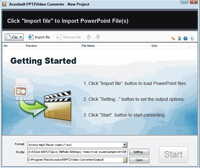
Second After downloading the program , Launch the program
Click Import button to choose any presentation you want to convert then choose an output format for the video you want to generate. And then click Start button to start the conversion process. (the application can convert presentations to video in MPEG, AVI, MP4, WMV, 3GP, FLV and MOV.)
After the conversion, you can upload your video to youtube, your site or your blog.. or burn it for back-up
China Mobile Phone Pc Suite
I know lots of people are searching for china phone pc suite to download
you came to the right site where you can download it for free
all i want to receive in return is a comment
1 china pc suite 1
2. china pc suite 2
3 china pc suite 3
good luck and enjoy using the china pc suite..
Tutorials on how to clean up your computer
You may wonder sometimes that you computer suddenly slowing down that is just only a sign that their is something wrong with your computer, like you hard drive is infected with adware, its very easy to know if theres an adware in you pc... they keep on puffing out of your monitor which is very annoying .another reason why is slows down,
dust, poor ventilation, insufficient hardware, damaged hardware, registry errors, disk fragmentation, malware, too many start-up programs, insufficient disk space, and junk files.
hope this information below will you solve your problem... don't forget to give you comments
All the following are FREE (Downloads can be found at Download.com)
A cool program I like to run before performing system slowing tasks - SmartClose
This program closes out of most unnecessary running tasks and programs, you can add tasks you want to keep running to a list. Programs can be restored upon request or at the next computer boot.
Uninstall unused programs, update your computer regularly, update obsolete or old programs.
Run Disk Cleanup - Start> All Programs> Accessories> System Tools> Disk Cleanup
Run Disk Defragmenter - Start> All Programs> Accessories> System Tools> Disk Deframenter
Remove Programs from Startup - Start> Run> msconfig
--Click on the Startup tab and uncheck the boxes of programs unnecessary to run at startup
Install and Run ONE Antivirus Program (Can cause system to slow down if the shield is active)
--AVG Anti-Virus Free Edition http://www.grisoft.com/
*--Avast Anti-Virus Home Edition http://www.avast.com/
--Avira Anti-Virus http://www.free-av.com/
Install and Run Anti-Spyware (Can cause system to slow down if the shield is active)
*--Spybot Search and Destroy http://www.safer-networking.org/
*--Spyware Terminator http://www.spywareterminator.com/
--AdAware http://www.lavasoft.com/
*--Spyware Blaster
Install and Run System Optimization tool
*--Ccleaner (Strongly Recommended) http://www.ccleaner.com/
*--Advanced WindowsCare http://www.iobit.com/
--Glary Utilities http://www.glaryutilities.com/
*--Auslogics Registry Defrag http://www.auslogics.com/
To Maintain Your Systems Safety a Firewall is Recommended (Can cause system to slow down if the shield is active)
*--Comodo
--Zonealarm
* = Favorites
If all this fails then you need new hardware/upgrades or you need to format/reinstall your hard drive/operating system.
tutorial on how to incresed the speed of you ram and system.
1). Start any application, you want to open.
2). Press CTRL+SHIFT+ESC to open Windows Task Manager and click
Processes tab and sort the list in descending order on Mem Usage. You will notice that the application the you open will be somewhere at the top, using multiple MBs of memory.
3). Now switch to to the application you have open and simply minimize it. (Don't use the Minimize All Windows option of the task bar).
4). Now go back to the Windows Task Manager and see where the apllication you have opn is listed. Most probably you will not find it at the top. You will typically have to scroll to the bottom of the list to find Word. Now check out the amount of RAM it is using. Surprised? The memory utilization has reduced by a huge amount.
5). Minimize each application that you are currently not working on by clicking on
the Minimize button & you can increase the amount of available RAM by a
substantial margin. Depending upon the number and type of applications you
use together, the difference can be as much as 50 percent of extra RAM.
In any multitasking system, minimizing an application means that it won't
be utilized by the user right now. Therefore, the OS automatically makes
the application use virtual memory & keeps bare minimum amounts of the
code in physical RAM.
Subscribe to:
Posts (Atom)
